
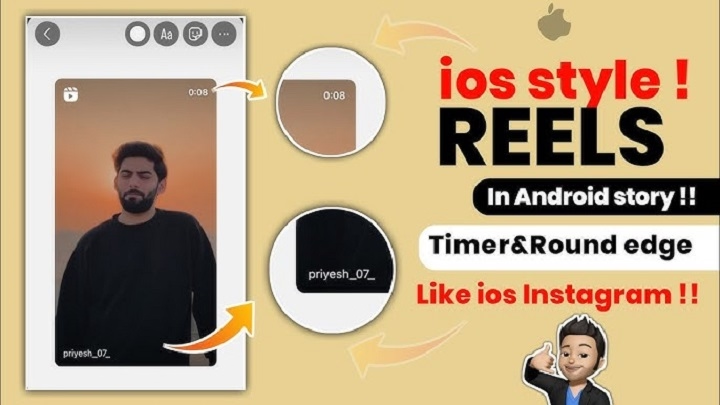
In the ever-evolving world of social media, Instagram has cemented itself as one of the leading platforms, particularly for visual storytelling. The Instagram Story feature, which allows users to share moments in a slideshow format, has become a powerful tool for personal expression, business marketing, and content creation. One key element in making Instagram stories stand out is the Instagram iPhone Story frame. This feature allows users to add customizable borders to their stories, enhancing their visual appeal.
This guide will explore how to create and use Instagram iPhone Story frames to level up your Instagram game. We’ll dive into everything you need to know, from setting up the frames on your iPhone to optimizing your stories for maximum engagement.
What Is an Instagram iPhone Story Frame?

An Instagram iPhone Story frame refers to a decorative border or frame that can be added around the content in your Instagram stories. These frames can be simple, elaborate, or themed according to your personal preferences. They provide a polished, professional look to your stories and can help you stand out in a crowded feed.
Instagram frames can be downloaded as templates or created manually using various apps and software. Once added to your story, these frames surround your image or video, enhancing its visual impact and providing a cohesive design that aligns with your personal or brand aesthetics.
Types of Instagram iPhone Story Frames
Instagram iPhone story frames come in different styles, ranging from minimalist to bold and colorful designs. Here are some popular types:
- Minimalistic Frames: Clean, subtle, and elegant designs that give your stories a simple yet refined look.
- Themed Frames: Frames designed to match specific occasions like holidays, birthdays, or events.
- Branding Frames: Custom frames used by businesses to promote their logos or keep their aesthetic consistent.
- Creative Frames: Fun, quirky designs perfect for adding personality and style to your stories.
How to Add an Instagram iPhone Story Frame
Adding an Instagram iPhone Story frame is simple. Here’s a step-by-step guide:
Step 1: Create or Choose Your Frame
You can either create a custom frame or download pre-made templates from various online sources. There are apps like Canva, Adobe Spark, or StoryArt that offer a wide selection of frames.
Creating a Custom Frame Using Canva:
- Open the Canva app on your iPhone.
- Choose the Instagram Story template size (1080 x 1920 pixels).
- Select “Elements” from the toolbar and choose a frame design you like.
- Customize the frame by adding your desired text, images, or colors.
- Download the frame to your device.
Downloading Pre-Made Frames:
If you prefer not to create a frame yourself, you can download free or premium frames from websites like:
- Canva
- Creative Market
- Unsplash (for high-quality photos)
- Instagram-specific apps like Storyluxe
Step 2: Upload Your Story
Once your frame is ready, go to Instagram and tap on your profile icon to open the story feature. Select your image or video that you want to post.
Step 3: Add the Frame to Your Story
After selecting your content, upload it to your story. To add the frame, follow these steps:
- Tap on the sticker icon at the top of the screen.
- Choose the “Uploads” option, and select the frame you created or downloaded.
- Adjust the frame to fit your image/video by resizing and repositioning it.
- Tap “Done” when you’re satisfied with the placement.
Step 4: Share Your Story
Once you’ve customized your story with a frame, you can add text, emojis, and stickers as usual. When you’re happy with the final result, share your story with your followers.
Tips for Creating Stunning Instagram iPhone Story Frames
Use High-Quality Images and Videos

When creating Instagram stories with frames, ensure that your content is of high quality. Clear, crisp images and well-edited videos will stand out more when placed inside a well-designed frame.
Stay Consistent with Your Aesthetic
Consistency is key, especially if you’re using Instagram for business. Choose frames that match your brand’s color palette and design elements. This helps create a cohesive aesthetic that resonates with your followers.
Keep the Frame Design Simple
While creative frames are fun, sometimes less is more. Avoid overly complicated frames that distract from the main content. Simple, clean frames with subtle accents work best for most occasions.
Use Custom Frames for Special Occasions
Custom frames are perfect for special events like holidays, birthdays, or product launches. By creating themed frames for these occasions, you can engage with your audience in a unique and relevant way.
Don’t Overcrowd Your Story
While frames are a great addition, don’t overcrowd your Instagram stories with too many elements. Allow the frame to complement your content rather than overwhelm it.
Why Use Instagram iPhone Story Frames?
Instagram frames serve several purposes, both for personal users and businesses. Here are some of the key reasons why you should consider adding frames to your Instagram stories:
Enhanced Visual Appeal
A well-designed frame can make your Instagram story more visually appealing. It can add structure and polish to your content, making it stand out in the feed.
Brand Recognition
For businesses and influencers, using custom frames that feature logos or brand colors is an excellent way to boost brand recognition. Custom frames help keep your content consistent and aligned with your branding.
Create a Personal Touch
Custom frames can help personalize your stories and express your unique style. Whether it’s a creative design, a special filter, or a simple border, frames give your stories a distinctive look.
Improve Engagement
Stories with unique, eye-catching frames tend to attract more attention. People are more likely to engage with your story if it stands out from the rest of the content on their feed.
Showcase Special Moments
Frames are ideal for celebrating milestones, special moments, or events. Whether it’s a birthday, vacation, or achievement, adding a frame helps you highlight these moments in a more exciting way.
Frequently Asked Questions (FAQs)
How do I create a custom frame for Instagram stories on my iPhone?
You can create a custom frame using apps like Canva, Adobe Spark, or StoryArt. Simply choose a template, customize the design, and download the frame to your iPhone.
Can I use Instagram iPhone story frames for videos?
Yes, Instagram frames can be added to both images and videos. Just upload your video, select your frame, and adjust it to fit.
Are there free Instagram iPhone story frames?
Yes, many websites and apps offer free Instagram frames. You can also create your own using free design tools like Canva.
How do I download a frame for Instagram stories?
Frames can be downloaded from design platforms like Canva or purchased from marketplace websites like Creative Market. After downloading, you can upload them directly to Instagram.
Can I use Instagram iPhone story frames for business?
Absolutely! Custom frames are a great way to maintain brand consistency and promote your business. You can add logos, taglines, and brand colors to your frames for a professional look.
Using Instagram iPhone Story frames is a fun and creative way to enhance your visual storytelling. Whether you’re a casual user or a brand looking to elevate your Instagram presence, frames can provide the polish and personality your content needs. By choosing the right frame and staying true to your aesthetic, you can captivate your audience and create more engaging stories that leave a lasting impression.